 CIS 307: Files and all that
[Accessing a block],
[Stable Storage],
[Versions of the Unix File System],
[Data and Index Blocks],
[Vnodes],
[Blocks, Fragments, Sectors],
[No overwrites: Write-Once],
[Read vs Write Efficiency],
[Log structured file systems],
[Conclusion]
These notes address material covered in Chapters 4
and 5 of Tanenbaum's
textbook (and a little bit from chapters 7 and 11). It is assumed that you
will study chapters 4 (read lightly the
section on security) and 5 (read lightly the section on terminals),
finish studying chapter 7.
Of course, you have already studied file structures and basic IO operations
in CIS207
Let's examine the time it takes to access (to read it or write it) a block
on a disk, given its location as cylinder, surface, sector. Let's
discount the time required to execute the software as negligible.
We then have the following times:
- Seek Time
- This is the time for moving the read/write head to the correct cylinder.
The head will accelerate at the beginning, move at constant speed for a while,
then decelerate. We can think of this time as a + b*d, where
a and b are disk specific constants and
d is the distance in cylinders from the start
to the target cylinder. This seek time is on average many milliseconds,
even many tens of milliseconds. Let's say it is 10ms.
We may try to improve the seek time by carefully sheduling disk operations,
or by locating records of a file so that the distance between them
is not great.
- Rotational Delay (Latency)
- This is the time, once we are at the right cylinder, to wait for the sector
to come to the read/write head. If we are lucky, it is immediately there.
If unlucky we have to wait for a whole revolution. On average we will wait
1/2 a revolution.
Since a disk spins fast, but not too fast [say, 6,000rpm, or 7,200rpm],
a revolution will take about 10ms and the rotational delay will be about
5ms. We can do little to reduce the rotational delay [we may use disk
scheduling, or use multiple heads, or improve sequential accesses, or ...].
- Transfer Time
- This is the time required to transfer the information. If we are
transferring k bytes and the transfer rate is r bytes per second, this
time is k/r. The transfer rate will be the smaller of two rates,
the transfer rate of the bus to which the disk is connected [say,
10MBps and up], and the transfer rate of the disk [i.e. what corresponds to
the rotation of the disk]. Say that a track has 64KB and the rotational speed
is 6000rpm, then this data rate is 6.4MBps]. Usually the transfer rate of the
disk is the smaller of the two trasfer rates. Note that as data density
increases
on disk, the disk data transfer rate increases in proportion
If we are transferring an 8KB block then the transfer time is 1.125ms
(in general, if we transfer k bytes, a track contains n bytes, and a rotation
takes r milliseconds, then the transfer time is k*r/n).
Unless we use very big blocks, the transfer time is much smaller
than the the seek and rotational delays.
[See Tanenbaum, pages 487-488] We would like the following to hold when we
write a value B to a disk sector s currently containing the value A:
after the write operation the sector contains either A or B,
independently of failures.
Persistent storage where this property holds is called
Stable Storage. It is highly desirable because it means that the write
operation is atomic. Unfortunately disks
satisfy instead a weaker property, the Weakly-Atomic Property:
After the write operation the sector will contain a value that is either
A, B, or such that when it is read it
gives a read error. We want to show how, given
disks that satisfy the weakly-atomic property we can build stable storage.
We consider two disks D1 and D2 that are mirror images of each other, i.e.
they have the same number of equally numbered sectors. Corresponding
sectors are intended to have the same content. Here is how we write
a value B to a sector s that has currently value A:
 1
    REPEAT
 2      write B to sector s on D1;
 3      read sector s from D1;
 4  UNTIL value read is without error;
 5
    REPEAT
 6      write B to sector s on D2;
 7      read sector s from D2;
 8  UNTIL value read is without error;
 9
We have numbered significant locations in the code. At 1 disks D1 and D2
have the same value A at sector s. At 2, 3, 4, and 5 D2 has value A at s.
At 5 D1 has B at s and D2 has A at s. At 6, 7, and 8 D1 at s has value B.
Reasoning similarly we see that at
9 we will have value B at s in both D1 and D2. Thus if all goes well
we have succeeded in making D1 and D2 mirrors of each other.
The problem is when there is a failure at an intermediate point after 1 and
before 9. Here is the procedure to follow after a failure.
 10 read sector s from D1;
    if read error then {
      REPEAT
        read value of sector s from D2 and write to sector s on D1;
        read sector s from D1;
      UNTIL value read is without error;
      return;}
 11 read sector s from D2;
    if read error then {
      REPEAT
        read value of sector s from D1 and write to sector s on D2;
        read sector s from D2;
      UNTIL value read is without error;
      return;}
    Compare values read from D1 and D2;
    if different then
      REPEAT
        write value read from s on D1 to s on D2;
        read sector s from D2;
      UNTIL value read is without error;
If there is a failure during this procedure, then this procedure is
called again. Note that if the read operation in statement 10 fails it must be
because we had a failure writing to D1, thus D2 contains the "true" value
(the old value). If instead the read operation in statement 11 fails
it must be because we had a failure writing D2, thus D1 contains the "true"
value (the new value).
Note that a write operation to stable storage takes (at least) two times
the time required for a write to normal storage. This is so since the writes
to the two copies must be done serially.
The Unix File System has changed in time, so as to improve functionality,
performance, and reliability. Three basic successive stages are represented by
s5fs, the system 5 file system,
FFS, the Berkeley Fast File System, and
BSD-LFS, the Berkeley (and others)
Log structured File System .
And before them all was the file system of the original Unix system.
Main concerns in the evolution were:
- How to make sure that the information
of a file is kept as close together as possible so as to minimize
seek time (and possibly rotational delay). In s5fs the inodes were
in a contiguous table (with up to 64K entries) followed by the blocks used
for the files. In FFS cylinder groups were introduced to keep
close the inodes and blocks of the files in the cylinder group. In
BSD-LFS inodes are allocated in the same (or close by) 1MB segments
as a the correspondent file blocks.
- How to increase the amount of data transfered in a write operation.
Larger blocks are used. In BSD-LFS data is transferred in 1MB segments
(or segment fractions)
- How to make the file system more reliable and with quicker recovery after
failure. Here various forms of write-once strategies are used.
- How to allow within a file system multiple kinds of file organizations
(say, as implemented by multiple manufacturers) and even access to
files on volumes mounted across a network. Here Vnodes are used.
Suppose that a file is 1MB and a block is 8KB. Then the file will have
125 blocks.
The question is: how do we keep track of these 125 data blocks of
the file. We can do this by using index blocks (also called
indirect blocks) that contain
pointers to other index and data blocks. In Unix the inode (see
Tanenbaum, page 165 and pages 308-310; notice their internal structure
and how they are kept on disk within an inode table that is at a fixed
location on disk) is 64 bytes and contains
13 pointers (only 12 in older systems).
The first 10 pointers are to data blocks. The 11th pointer
points to a single indirection index block, i.e. an index block with
pointers to data blocks. The 12th pointer points to a double indirection
index block, i.e. an index block that points to index blocks that point to
data blocks. The 13th pointer points to a triple indirection index block.
If we assume that a block is 8KB and a pointer is 8B, then an index block will
contain 1K pointers. The maximum size of a file will be
8KB*(10 + 2**10 + 2**20 + 2**30), that is more than 16TB. [Different
Unix implementation may have different values.]
Some observations:
- Access time is different at different locations in a file.
The first 10 blocks are accessed with a single read (the pointers are in
main memory where the inode is brought when the file is opened). The next
1K blocks require up to two reads, one for the index block, one for the
data block.
The next 1M blocks require up to three reads, and the next 1G blocks require
up to four reads. Clearly access time is good at the beginning of the file
and gets worse and worse as we move towards its end. This is true also during
sequential access [not good if we keep movies on disk].
- One needs to have a clear idea of how addressing is done, i.e.
how to determine, given an address, which blocks to
read and how to compute displacements.
For example, if we seek for byte 100,000,000 in a file, we need to go
to the 12,207 block, and then look for the 256th byte. We have to use the
12th inode pointer, thus skipping (10+1K) blocks and remaining with
11,173 blocks. From the 12th inode pointer we go to a double indirection
index block.
Here each pointer counts as 1K blocks. Thus we have to skip 10 pointers
(i.e. 10*1K=10,240 blocks, thus remaining with 933 blocks to go) and follow
the 11th pointer to a single indirection index block.
Here we go to the 933 pointer
and follow it to a data block where the 256th byte is what we are aiming for.
Clearly we can write a procedure to do this calculation and to allocate
index and data blocks if it is necessary for a write operation.
- The following is a legal sequence of operations: write one byte,
seek 1MB(from beginning of file),
write another byte,
seek 1GB (from beginning of file) and write another byte. Most of the
resulting file is with
undefined content. One needs to understand the resulting structure of the file
in terms of its data and index blocks. In the example we will have:
- The first inode pointer points to a block where the first byte is written.
- The next 9 inode pointers are null.
- The next inode pointer points to an index block with 1014 null pointers,
followed by a pointer to a data block where only the first byte is defined.
- The next inode pointer points to an index block where the first
1023 pointers are null, etc.
- The next inode pointer is undefined.
- File creation is a time consuming operation. We have to create an inode
in the inode list, we have to create an entry in the directory where the file
is located and, if the file is non empty, say it has the first byte, we need
to allocate and initialize a data block. In general when a file is modified
we may have to update directory, inode, index blocks, and data blocks. If these
data structure are far apart we may spend a lot of time in seeking operations.
- Directories in Unix are like regular files. The only difference is that
they contain file entries. Each file entry has two parts, the name of the file,
and the inode number of the file. The latter is used to index into the in disk
inode list and to retrieve the inode that describes the file. This inode will
be in the in memory inode map while the file is open.
Vnodes were introduced by Sun [this is after s5fs and FFS]
to allow multiple (implementations of)
file systems to be accessed within a single Unix system,
even access to file systems that are
not within a single computer system.
A Vnode is a data structure
that contains file-system-dependent private data and pointers to functions
implementing the file system's interface (things like, open, read, ..).
Thus a Vnode is just like a class in C++: it gives us a file as an object
hiding the details of its implementation. Vnodes are used also to access
files on volumes mounted across a network. In the normal case a Vnode
will point to an inode.
The internal structure of disks is fairly complex. Here is some information on
such structure for SunOS. The physical unit of storage is a
sector
(on the Sun it is 512B). The unit of transfer for information is the
block
(on the Sun it is 8KB). A block, thus, includes many sectors (16 in this case).
Since blocks are large and often files are small, there is an intermediate
unit between
"sector" and "block", the fragment. A fragment is at least as large as
a sector, and
it is smaller than a block. Essentially, a block is broken up into fragments
so that
a small file just gets a fragment, and a larger file does not have to allocate
a full block unless it is necessary. Distinct fragments within
a block may belong to
different files (implementation dependent, 2 fragments, or 4 fragments, or..).
As a file grows, it may require
rewrites of a fragment into a new fragment or a block. For example,
if a file is
(2*8KB+2KB), then it has two blocks plus a 2KB fragment. If it now grows
to 3*8KB, a new block
is allocated and written to while the fragment is freed. A file can have
fragments only in its last block, and a file with a fragment
must not have index blocks.
By using fragments the utilization of storage is improved, at
the cost of additional programming complexity.
The following is a description of a simple low level file system intended
to be reliable and fairly efficient [the idea is by J.Abrial]. For reliability
it never overwrites a block [there is one exception to this rule] instead it
always allocates a new block. While a computer is running there may be
a difference between how the file system appears in disk and how it appears
from main memory. The two views are reconciled when there is a checkpoint
operation. We simplify things by assuming that each file has exactly one index
block, from which one reaches all the data blocks of that file. The following
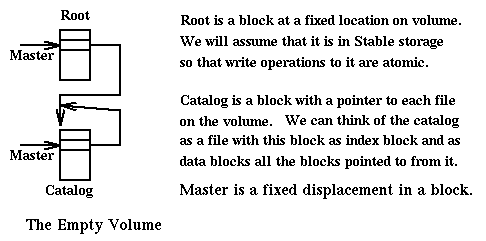
figure describes an empty volume
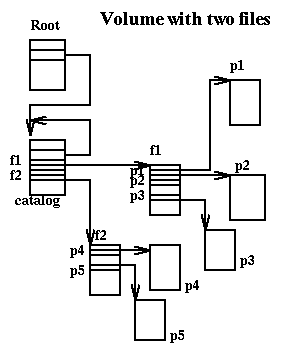
And the following figure describes a volume in which we have two files, one with
two blocks and the other with three.
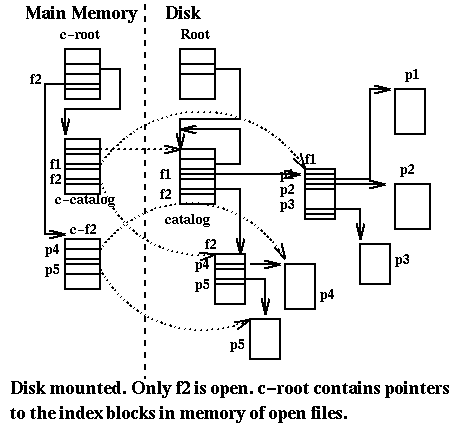
When a volume is mounted we will have in (main) memory structures corresponding
to the root (the root block is also called the superblock),
c-root, to the catalog, c-catalog, and to the index blocks of each
open file. The file system will be seen in memory from these structures.
The following figure describes the state of volume and memory when the volume
is mounted and we have
opened the file f2.
We can describe the basic operations of this file system:
Mount()
-
- Allocate a block in (main) memory, call it c-root, and copy root block to it
- Allocate a block in memory, call it c-catalog, and copy catalog block to it
- Set c-root[master] to the address of c-catalog.
- Determine list of free blocks on disk (you could trace from root)
create(f): f is a file that does not exist (after, f is not open)
-
- Allocate and initialize a free block on disk
- Set c-catalog[f] to its address
[This operation could be made more efficient, to not require I/O]
open(f): f is a file that is not open
-
- Allocate a block in memory, call it c-f, and copy index block f to it
- Set c-root[f] to the address of c-f
read(f,p): f is an open file, p is one of its pages
-
- Allocate a block in memory, call it c-p, and copy block p to it
write(f,p,v): f is an open file, p is a page of f, v is a
page-content
-
- Allocate a free block p' on disk and write v to it
- Set c-f[p] to the address of p'
close(f): f is an open file
-
- Allocate a free block f' on disk and copy c-f to it
- Set c-catalog[f] to f'
- Set c-root[f] to undefined
delete(f): f is an existing closed file
-
- Take f out of c-catalog
dismount()
-
- Close each open file
- Allocate a free block catalog' on disk
- Set c-root[master] and c-catalog[master] to catalog'
- Write c-catalog on catalog'
- Overwrite root with c-root. [Remember that root is in stable storage]
Only after the volume is dismounted the file system on disk coincides with
the file disk as it was seen in main memory. Until the dismount operation all
changes in the file system since the last mount are lost in case of failure.
It is easy to think of a checkpoint operation that guaranties more
frequent safe state updates. In any case after all failures we will always
restart with a consistent file system on disk.
This technique is also efficient. We have seen that delete involves no I/O.
The copy operation is also very fast because we only need to copy the index
block. The data blocks are changed only for write operations.
[You may compare this approach to the way Unix maintains file consistency
(Tanenbaum pp175-177).]
John Ousterhout
has stated that the two principal bottlenecks impeding progress
towards the development of
high performance systems are:
- the low data rate on the main memory channel, and
- the slowness of disk write operations.
Ousterhout stresses the difference between read and write operations. Read
operations from disk are speeded up substantially by the use of sizable
semiconductor dynamic memory caches. Caches do not help in the case of write
operations since for reliability reasons information is immediately
written to disk. [In Berkeley Unix they write immediately (synchronously)
the inodes and directories. Data blocks can be written out
asynchronously.]
Ousterhout suggests that we must improve average time
for write operations by reducing the amount of synchronous writes by
using buffers in static memory and, as we will see in log structured
file systems, by reducing seek times required for access to inode and
directory blocks by placing them close to each other.
[For additional information
Rosenblum,M.,Ousterhout,J.K.(1992) "The Design and Implementation of a
log-structured File System", ACM Trans on Computer Systems, pp26-52
and also Saltzer]
Ousterhout has determined
experimentally that traditional file systems have a write bandwidth of about
5% [i.e. if the disk is capable to write sequentially data at 10MBps,
in reality we can write to files at the rate of only 0.5MBps. This is easy to
see: if in a track we have 64KB and we write only a 4KB sector during a
rotation, then we will use onty 1/16th of what is possible.]. The
log-structured file system proposed by Rosenblum and Ousterhout
achieves a factor of 10 improvement in write bandwidth [i.e. in the
example above, we can write to files at the rate of over 5MBps]. This result
is achieved in the case of small files (for big files performance does not
improve significantly) and assuming that there are no crashes, or that
there are write buffers in non-volatile RAM memory.
The key idea of the log-structured file system is to delay writes so that
they can be made in big chunks, called segments, that include
data blocks, index blocks, directory blocks, inodes, and inode list blocks (all
inode list blocks are accessible from a single fixed location on disk).
A segment is 1MB (or 0.5MB). A problem is how to manage space for segments
and to deal with deletions in their content. The solution chosen is:
- To manage a disk volume as an array of segments (in a 1GB disk we have
1000 entries). Then each segment can be managed as an array of 2 (or 4)
subsegments.
- The content of the disk is seen as a log where segments are linked together
and writing occurs only in a segment added to the end of the log.
- In main memory (and checkpointed to a disk file, called
ifile) is a hashtable associating inode ids to locations
on disk where the inode is stored and a table (also checkpointed to the
ifile) with information about segments.
- To compact the content of segments thus freeing pre-existing segments.
This can be done by a background process.
File systems remain an essential component of operating systems. Efforts
are being made to improve their reliability and have their performance
keep pace with improvements in CPU performance. Compression is being used to
improve both performance and storage utilization. Real-time issues are
a concern. As files are being used to store movies, it is important
to be able to store very large files and to guaranty limited delays in reading
sequentially files. And then there is the use of files in distributed
systems....
ingargiola.cis.temple.edu