 CIS 307: Unix II
 CIS 307: Unix II
[Errors], [Pipes], [FIFOs], [Protection], [File Locking], [Signals], [Shared Memory]
   ECHILD : No children
   EINTR  : Interrupted system call
   EINVAL : Invalid argument
   EPIPE  : Broken pipe
Beware that errno is updated only when a call fails, not after each call!
We can use the Standard C Library function strerror to return a string describing the meaning of the current value of errno.
   #include <string.h>
   char *strerror(int errnum);
For example:
fprintf(STDERR_FILENO, "In Child 1: %s\n", strerror(errno));
We can use the Standard C Library function perror to write to the standard error file a string of our chosing and a description of the errno value.
   #include <stdio.h>
   void perror(const char *string);
For example:
perror("In Child 1");
    #include <unistd.h>
    int pipe(int filedescriptor[2]);
	It returns 0 for success and -1 for failure
	When successful it places two file descriptors in filedescriptor,
	one at 0 for reading, one at 1 for writing. These two
	files are the endpoints of a pipe. [In some systems both
	ends of a pipe are bidirectional.]
	The capacity of a pipe in bytes is usually defined by the
	constant PIPE_BUF. One may write to a pipe a block that is
        larger than PIPE_BUF, but in that case the write operation
        is not guaranteed to be atomic [i.e. concurrent writes may
        interleave their data].
Pipes are opened by a process which then forks. Then the parent process and the children processes can communicate through the pipe. For example:
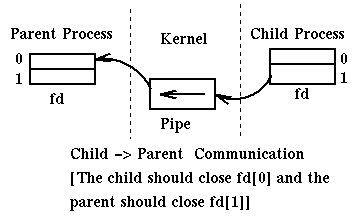
Here is a complex way of writing our favorite program "Hello World":
    #include <sys/types.h>
    #include <unistd.h>
    #include <stdio.h>
    #define MAXLINE 256

    int main(void)
    {
	int	n, fd[2];
	pid_t	pid;
	char	line[MAXLINE];

	if (pipe(fd) < 0) {
		write(STDERR_FILENO, "pipe error\n", 11);
		exit(1);}
	if ( (pid = fork()) < 0) {
		fprintf(STDERR_FILENO, "fork error\n", 11);
		exit(1);}
	else if (pid == 0) {		/* child */
		close(fd[0]);
		write(fd[1], "hello world\n", 12);
	} else {			/* parent */
		close(fd[1]);
		n = read(fd[0], line, MAXLINE);
		write(STDOUT_FILENO, line, n);}
	exit(0);
    }
A useful implicit use of pipes is in the C standard library functions:
    #include <stdio.h>
    FILE *popen(const char *cmdstring, const char *type);
	It executes cmdstring and returns a file.
	We read from the file the output of the command, if type is "r"
	We write to the file the input for the command, if type is "w"
    int pclose(FILE *fp);
and here is a simple use of popen:
  #include <stdio.h>
  #define MAXSIZE 256

  main(argc, argv)
     int argc;
     char **argv;
  {
    char line[MAXSIZE];
    FILE *fp;

    if ((fp = popen("ls","r")) == NULL) {
      perror("popen error");
      exit(1);
    }
    while (fgets(line, MAXSIZE, fp) != NULL) {
      printf("%s",line);
    }
    pclose(fp);
    exit(0);
  }
Of course we could have achieved the same effect, in this case, with
the simpler command system.
   #include <sys/types.h>
   #include <sys/stat.h>

   int mkfifo(const char *path, mode_t mode);
   where path is the name for the fifo amd mode specifies the access
   mode to the fifo.
The following two programs twin1.c and twin2.c show how two distinct programs can communicate through a fifo.
Unix recognizes the following User Kinds: ogua [o: owner;
g: group; u: user; a: all of the above] and the following
Operation Rights: rwxst [r: Read access; w: Write access;
x: Execute access; s: Set_user_id;
s: Set_group_id; t: text;]
Beware that operation rights can have different meaning on directories and on
regular files. Review the shell command chmod and the
use of MASK.
The set-user-id, set-group-id are particularly interesting (and protected by
patent) because they allow a process to execute a file with the rights
of the owner of the file and not of the owner of the process (why is this so
nice?.)
File locking can be file oriented or
record oriented depending on the
scope of the lock, the whole file or a portion thereof.
Locks are read-write locks, i.e. they can be used
as read locks (multiple concurrent reads are allowed) or as
write locks (writes are mutually exclusive). Of course
Write locks are mutually exclusive with both read and write locks.
Locking can be
mandatory or advisory. Advisory locks have effect only for
processes that lock a file before accessing it and unlock it after.
Mandatory locks protect a file also against processes that
do not use lock/unlock as required. Mandatory locks should be avoided
whenever possible because of efficiency reasons.
Locks can be blocking or non blocking. They are blocking if
when a lock cannot be immediately acquired the process executing the call
waits; it is non-blocking if the call returns with a code that indicates
success or failure in acquiring the lock.
A basic commands for locking files is fcntl which uses the data structure flock.
    #include <sys/types.h>
    #include <unistd.h>
    #include <fcntl.h>
    int fcntl(int filedes, int cmd, struct flock *flockptr);
       cmd can be F_GETLK (get lock information), F_SETLK (non-blocking),
            F_SETLKW (blocking), ...
       fcntl return -1 in case of error, a non-negative number otherwise.

    struct flock{
      short l_type;   /* This field can take the values:
                       * F_RDLCK  - read (shared) lock
                       * F_WRLCK  - write (exclusive) lock
                       * F_UNLCK  - remove lock(s)
                       */
      off_t l_start;  /* offset in bytes to beginning of record being locked*/
                      /* starting from position specified by l_whence */
      short l_whence; /* This field can take the values:
                       * SEEK_SET - offset is relative to beginning of file
                       * SEEK_CUR - offset is relative to cursor
                       * SEEK_END - offset is relative to end of file */
      off_t l_len;    /* length in bytes of record being locked */
      pid_t l_pid;}   /* pid of process owning the lock */
    The information in flock is relative to the current process. Other
    processes using this file will have their own flock structures.
Here is code, copied from Stevens, for using fcntl to set a read lock or a
write lock (both blocking and non blocking versions) and for unlocking a file:
    #include <sys/types.h>
    #include <fcntl.h>

    int lock_reg(int fd, int cmd, int type, off_t offset, int whence, off_t len)
    {
    struct flock  lock;

    lock.l_type = type;
    lock.l_start = offset;
    lock.l_whence = whence;
    lock.l_len = len;
    return (fcntl(fd,cmd,&lock));
    }

    #define read_lock(fd, offset, whence, len) \
        lock_reg(fd, F_SETLK, F_RDLCK, offset, whence, len)
    #define readw_lock(fd, offset, whence, len) \
        lock_reg(fd, F_SETLKW, F_RDLCK, offset, whence, len)
    #define write_lock(fd, offset, whence, len) \
        lock_reg(fd, F_SETLK, F_WRLCK, offset, whence, len)
    #define writew_lock(fd, offset, whence, len) \
        lock_reg(fd, F_SETLKW, F_WRLCK, offset, whence, len)
    #define un_lock(fd, offset, whence, len) \
        lock_reg(fd, F_SETLK, F_UNLCK, offset, whence, len)
Here is how we can use a file lock to implement a critical region (We assume we have the definitions for writew_lock and un_lock.)
    #define FILE_MODE (S_IRUSR | S_IRGRP | S_IROTH)
    /* default permissions for new files: Read permission for
     * user, group, and others. */

    int main(void)
    {
    int fd;

    if ((fd = open("lockfile", O_WRONLY | O_CREAT, FILE_MODE)) < 0) {
      perror ("open error");
      exit(1);}
    if (writew_lock(fd,0,SEEK_SET,1) < 0) {       /* prolog */
      perror ("lock error");
      exit(1);}

    sleep(30); /* this represents the critical region */

    un_lock(fd,0,SEEK_SET,1);                     /* epilog */
    exit(0);
    }
Stevens shows that advisory file record locking can be used in place of semaphores to implement critical regions essentially without any performance degradation.
There is also a function flock which is easier to use than fcntl. It works with advisory locks. However, while fcntl works even in a distributed file system, flock works only on processes sharing the same computer (at least it is so on OSF on my alpha).
Here is a simple use of flock to implement a critical region:
    #include <sys/file.h>

    int main(void){
    int fd;

    if ((fd = open("lockfile", O_WRONLY | O_CREAT)) < 0) {
      perror ("open error");
      exit(1);}
    flock(fd, LOCK_EX); /* prolog */
    sleep(30);          /* this represents the critical region */
    flock(fd, LOCK_UN); /* epilog */
    exit(0);
    }
You can look at another way of using file locks in the
hints for an old
homework.
Signals represent a very limited form of interprocess communication. They are easy to use (hard to use well) but they communicate very little information. In addition the sender (if it is a process) and receiver must belong to the same user id, or the sender must be the superuser. Signals are sent explicitly to a process from another process using the kill function. Signals can indicate some significant terminal action, such as Hang Up. Alternatively signals are sent to a process from the hardware (to indicate things like numeric overflow, or illegal address) through mediation of the OS. There are only a few possible signals (usually 32). A process can specify with a mask (1 bit per signal) what it wants to be done with a signal directed to it, whether to block it or to deliver it. Blocked signals remain pending, i.e. we may ask to have them delivered later. A process specifies with the signal function (obsolete) or with the sigaction function what it wants it to be done when signals are delivered to it. There are three things that can be done when a signal is delivered:
The following diagram describes how a signal is raised, possibly blocked before delivery, and then handled.
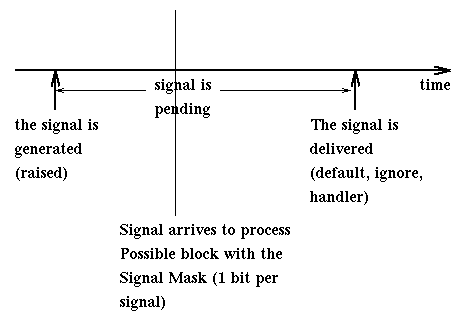
We may worry that signals may be lost while pending [if this happens, we talk of an unsafe signal mechanism], but recent Unix system use only reliable mechanisms. Multiple copies of the same signal may be pending to a process so the OS must have facilities to store this information. Multiple copies of an idempotent signal (i.e., two copies of the signal have the same effect as just one, like the termination request) are treated as single copies.
Here are some of the possible signals, with the number associated to them, and their default handling.
    SIGNAL      ID   DEFAULT  DESCRIPTION
    ======================================================================
    SIGHUP      1    Termin.  Hang up on controlling terminal
    SIGINT      2    Termin.  Interrupt. Generated when we enter CNRTL-C
    SIGQUIT     3    Core     Generated when at terminal we enter CNRTL-\
    SIGILL      4    Core     Generated when we executed an illegal instruction
    SIGTRAP     5    Core     Trace trap (not reset when caught)
    SIGABRT     6    Core     Generated by the abort function
    SIGFPE      8    Core     Floating Point error
    SIGKILL     9    Termin.  Termination (can't catch, block, ignore)
    SIGBUS     10    Core     Generated in case of hardware fault
    SIGSEGV    11    Core     Generated in case of illegal address
    SIGSYS     12    Core     Generated when we use a bad argument in a
                              system service call
    SIGPIPE    13    Termin.  Generated when writing to a pipe or a socket
                              while no process is reading at other end
    SIGALRM    14    Termin.  Generated by clock when alarm expires
    SIGTERM    15    Termin.  Software termination signal
    SIGURG     16    Ignore   Urgent condition on IO channel
    SIGCHLD    20    Ignore   A child process has terminated or stopped
    SIGTTIN    21    Stop     Generated when a backgorund process reads
                              from terminal
    SIGTTOUT   22    Stop     Generated when a background process writes
                              to terminal
    SIGXCPU    24    Discard  CPU time has expired
    SIGUSR1    30    Termin.  User defiled signal 1
    SIGUSR2    31    Termin.  User defined signal 2
One can see the effect of these signal by executing in the shell the
kill command. For example
% kill -TERM pidid
You may see what are the defined signals with the shell command
% kill -l
It is easy to see that some signals occur synchronously with the executing program (for example SIGSEGV), others asynchronously (for example SIGINT), and others are directed from one process to another (for example SIGKILL).
Here are some basic functions for signals:
    #include <signal.h>
    void (*signal(int sign, void(*function)(int)))(int);
         The signal function takes two parameters, an integer
	 and the address of a function of one integer argument which
	 gives no return. Signal returns the address of a function of
	 one integer argument that returns nothing.
         sign identifies a signal
         the second argument is either SIG_IGN (ignore the signal)
	 or SIG_DFL (do the default action for this signal), or
	 the address of the function that will handle the signal.
	 It returns the previous handler to the sign signal.
         The signal function is still available in modern Unix
         systems, but only for compatibility reasons.
         It is better to use sigaction.


    #include <signal.h>
    void sigaction(int signo, const struct sigaction *action,
                   struct sigaction *old_action);
    where
      struct sigaction {
        void (*sa-handler) (int); /*address of signal handler*/
        sigset_t  sa_mask;        /*signals to block in addition to the one
                                    being handled*/
        int  sa_flags;};          /*It specifies special handling for a
                                    signal. For simplicity we will assume
                                    it is 0.*/
        /*The possible values of sa_handler are:
          SIG_IGN:    ignore the signal
          SIG_DFL:    do the default action for this signal
          or the address of the signal handler*/

    Objects of type sigset_t can be manipulated with the functions:

    #include <signal.h>
    int sigemptyset(sigset_t * sigmask);
    int sigaddset(sigset_t * sigmask, const int signal_num);
    int sigdelset(sigset_t * sigmask, const int signal_num);
    int sigfillset(sigset_t * sigmask);
    int sigismember(const sigset_t * sigmask, const int signal_num);

    that have the meaning implied by their names.

    We can determine, or change, the mask currently defined for
    blocking signals in the system, with the function

    #include <signal.h>
    int sigprocmask(int cmd, const sigset_t* new_mask, sigset_t* old_mask);
    where the parameter cmd can have the values
      SIG_SETMASK:  sets the system mask to new_mask
      SIG_BLOCK:    Adds the signals in new_mask to the system mask
      SIG_UNBLOCK:  Removes the signals in new_mask from system mask
    If old_mask is not null, it is set to the previous value of the system
    mask

    #include <sys/types.h>
    #include <signal.h>
    int kill(pid_t process-id, int sign);
	Sends the signal sign to the process process-id.
	[kill may also be used to send signals to groups of
	processes.]
Other useful functions are:
    #include <unistd.h>
    unsigned int alarm(unsigned int n);
        It requests the delivery in n seconds of a SIGALRM signal.
        If n is 0 it cancels a requested alarm.
        It returns the number of seconds left for the previous call to
        alarm (0 if none is pending).

    #include <unistd.h>
    int pause(void);
        It requests to be put to sleep until the process receives a signal.
        It always returns -1.

    #include <signal.h>
    int sigsuspend(const sigset_t *sigmask);
        It saves the current (blocking) signal mask and sets it to
	sigmask. Then it waits for a non-blocked signal to arrive.
	At which time it restores the old signal mask, returns -1,
        and sets errno to EINTR (since the system service was
        interrupted by a signal).
	It is used in place of pause when afraid of race conditions
	in the situation where we block some signals, then we unblock
        and would like to wait for one of them to occur.
The use of the function signal is being replaced
in recent Unix versions
by the use of the function sigaction which is more complex
and uses signal sets. The functions signal and pause
are still being supported for
compatibility reasons.
Here is a very simple example of use of signals (modified from Stevens)
    #include	<sys/types.h>
    #include	<signal.h>
    #include	<stdio.h>

    static void	sig_cld();

    int
    main()
    {
	pid_t	pid;
	int     i;

	if ((int)signal(SIGCLD, sig_cld) == -1) {
		printf("signal error\n");
                exit(1);}
	for (i=0; i < 10; i++){
	  if ( (pid = fork()) < 0) {
	    printf("fork error\n");
	    exit(1);}
	  else if (pid == 0) {		/* child */
	    sleep(2);
	    exit(0);
	  }
	  pause();	/* parent */
	}
	exit(0);
    }

    static void
    sig_cld()
    {
	pid_t	pid;
	int	status;

	printf("SIGCLD received, ");
	if ( (pid = wait(&status)) < 0){	/* fetch child status */
		printf("wait error\n");
                exit(1);}
	printf("pid = %d\n", pid);
	return;		                        /* interrupts pause() */
    }
This program binds the signal SIGCLD to a handler sig_cld, then it loops
ten times. In each iteration it creates a child and pauses. The handler
is called when the child terminates. It collects and prints out information
about the defunct child.As we saw earlier, the programmer can control which signals are blocked [a blocked signal remains pending until the program unblocks that signal and the signal is delivered] with the sigprocmask function.
Here is an example of a program that uses sigaction and sigsuspend instead of signal and pause.
/* Process sets a handler for SIGILL, and suspends until any
 * signal is received. If SIGILL is received the handler
 * is executed; for all other signals the handler is not executed.
 * You can run this program with "% a.out &". The program prints
 * its own processid. Then you can send a SIGILL signal to it with
 *             % kill -ILL processid
 * Sending any other signal will not invoke the handler and will have
 * the usual behavior: will be ignored or will terminate the process.
 */

#include <stdio.h>
#include <unistd.h>
#include <signal.h>

void handler(int a );

int main() {
  sigset_t  zeromask;
  struct sigaction  action, old_action;

  /* Block all signals when executing handler */
  sigfillset(&action.sa_mask);
  action.sa_handler = handler;
  action.sa_flags = 0;
  if (sigaction(SIGILL,&action,&old_action)==-1)
    perror( "sigaction");
  /* wait for any signal */
  sigemptyset(&zeromask);
  sigsuspend(&zeromask);
  printf("After signal is received and perhaps handled\n");
  return 0;
}

void handler(int a){
  printf("\ncaught signal %d\n", a);
};
To use signals well is very tricky. Signals can interfere with system services. For example, what happens if we receive an exception while executing a system call? The answer depends on the specific call. Usually time consuming operations such as IO operations are interrupted by a signal. For example if we are reading from a file we may be interrupted. We find out about it by checking errno for the value EINTR. For example:
   while (bytesread = read(input_fd, buf, BLKSIZE)) {
      if ((bytesread < 0) && (errno == EINTR)) {
         printf("The read was interrupted. You can try to read again\n");
      } else {
         printf("Error in read. Don't know what to do about it\n");
         break;
      }
   }
Here is another program that shows the effect of signals on system services, sleep in this case. The termination of the child will wake the parent from its sleep by delivering the signal SIGCHLD.
#include <stdio.h>
#include <unistd.h>
#include <signal.h>
#include <errno.h>

void handler(int a );

int main() {

  sigset_t  sigmask;
  struct sigaction  action, old_action;
  pid_t childpid;
  int remaining_time;

  /* Set up handler for SIGCHLD */
  sigfillset(&action.sa_mask); /*Block all signals while executing handler*/
  action.sa_handler = handler;
  action.sa_flags = 0;
  if (sigaction(SIGCHLD, &action, &old_action)==-1)
    perror( "sigaction");

  /* Create and run the child process */
  if((childpid=fork())<0){
    perror("Fork error");
    exit(0);
  }
  if (childpid==0){
    /* The child process executes the ls command and exits */
    sleep(3); /* Just to make sure that the parent will run first */
    if(execlp("ls","ls",(char *)0)!=0){
      perror("exec did not work");
      exit(1);
    }
    /* Note that the child at this point has terminated */
  }

  /* We are in the parent */
  printf("The child is %d\n", childpid);
  remaining_time = 10;
  do {
    remaining_time = sleep(remaining_time);
    printf("The remaining sleep time is %d\n", remaining_time);
  }while(remaining_time > 0);
  printf("Parent has slept, now it returns\n");
  return 0;
}

void handler(int a){  /* a is the signal being handled */
  pid_t pid;
  int statloc;

  printf("\nWe caught signal %d\n", a);
  pid = wait(&statloc);
  printf("Terminated child was %d with exit code %d\n",
	 pid, statloc);
};
Shared memory segments are an example of IPC resources (other examples in Unix are semaphores and named queues). In Unix these resources are associated to identifiers, i.e. to unique names (unique at an instant since identifiers may be reused). We need to make sure that communicating processes all know the identity of the shared IPC. This can be done by agreeing on a key (a string) to be converted to an identifier by the system (but nobody guaranties uniqueness of keys) or by passing the identifiers at run time in some fashion among the communicating processes.
When using IPC resources in Unix it is important to make sure that these resources are deleted after use and do not remain in the system. You can make sure that things are ok by using the shell command ipcs to determine which resources are in use and the command ipcrm to remove those you own and want removed.
Here are the basic functions and constants for using shared memory:
    SHMLBA means 'low boundary address multiple'. It is a power of 2.
    It represents the required alignment for the shared segment.
    SHM_R and SHM_W are flag for read and write permission.
    SHM_LOCK and SHM_UNLOCK specify 'Lock segment in core' and
    'Unlock segment from core'.

     #include <sys/shm.h>

     int shmget (key_t key, int size, int flag);
     get shared memory segment identifier.
     Returns the shared memory identifier associated with KEY,
     or -1 in case of error.
     A shared memory identifier and associated data structure and
     shared memory segment of at least size are created for KEY if one
     of the following are true:
	key  is equal to IPC_PRIVATE, or
	key  does not already have a shared memory identifier
          associated with it and IPC_CREAT is specified in flag, or
        key has already a shared memory identifier associated
        with it and IPC_CREAT is specified in flag and IPC_EXCL
        is not specified in flag.
        We will only use the IPC_PRIVATE form.
     Upon creation, the data structure associated with the new
     shared memory identifier is initialized.
     The way we use it, the shmget command should be executed
     by exactly one of the processes sharing the memory segment.

     int shmctl (int shmid, int cmd, struct shmid_ds *buf);
	It is used to examine or update the characteristics of an
	existing segment.
	Returns 0 if ok, -1 on error
	cmd parameter is:
	IPC_STAT  Fetch shmid_ds for this segment and store its value at buf
	IPC_SET   Set shm_perm.uid, shm_perm.gid, shm_perm.mode
		  from buf. Can be executed only by shm_perm.cuid, or
		  shm_perm.uid, or superuser.
	IPC_RMID  Remove shared memory segment from system.
		  [It reduces count of users. When 0, it is deleted.]
		  It can be executed only by shm_perm.cuid,
		  or shm_perm.uid, or superuser.
	SHM_LOCK  Lock segment in memory. Only the superuser.
	SHM_UNLOCK Unlock segment from memory. Only the superuser.

     Here is the definition of struct shmid_ds:

     struct shmid_ds{
        struct ipc_perm shm_perm; /*Protection inof for this region*/
        int shm_segsz;      /*Size of shared region in bytes*/
        u_short shm_lpid;   /*Process Id of creator of this region*/
        u_short shm_cpid;   /*Id of last process to perform shmat or shmdt
                              on this region*/
        u_short shm_nattch; /*Number of processes currently attached*/
        time_t shm_atime;   /*Time of last shmat operation*/
        time_t shm_dtime;   /*Time of last shmdt operation*/
        time_t shm_ctyme;   /*Time of last shmctl operation*/
      }

     void *shmat(int shmid, void *addr, int flag);
	It is used to bind an address in the process space to the origin
	of a shared segment.
	Returns pointer to shared memory segment if ok, -1 on error.
	If addr is 0, the segment is attached at the first available
        address (in the user space) as selected by the kernel. Best way.
	If addr<>0 and SHM_RND is not specified in the flag,
        the segment is attached at the address given by addr.
	If addr<>0 and SHM_RND is specified in the flag,
        the segment is attached at the address given by
        (addr - (addr mod SHMLBA)).
        If flag contains SHM_RDONLY, then the segment can only be read
        not written to.

    int shmdt(void *addr);
	Detaches this segment from the process's address space.
	The segment is not removed from system until the segment
	is actually removed by using of shmctl.
Here is an example of use of shared memory. A process forks.
The child will ask interactively an integer from the user, store it
in shared memory, and then terminate.
The parent will wait for the child to terminate,
read the integer from shared memory and print it out.
It is all fairly easy since the identity of the shared segment as created
by the parent is inherited by the child.
#include    <stdio.h>
#include	<sys/types.h>
#include	<sys/ipc.h>
#include	<sys/shm.h>


#define	SHM_MODE	(SHM_R | SHM_W)	/* user read/write */

int main(void)
{
	int	shmid;
	char	*ptr, *shmptr;
	int     *p, *q;
        pid_t   pid, npid;
        int     statusloc;

	/* allocate ipc key in parent for a small shared segment*/
	if ( (shmid = shmget(IPC_PRIVATE, sizeof(int), SHM_MODE)) < 0) {
		printf("shmget error\n");
		exit(1);}
	/* create child; it inherits the ipc key from parent */
        if ((pid = fork()) < 0) {
	       printf("fork error\n");
	       exit(1);}
	else if (pid == 0) {  /* child */
	    /* attach to shared area and read an integer */
	    if ( (shmptr = (char *)shmat(shmid, 0, 0)) == (void *) -1) {
		printf("shmat error in child\n");
	        exit(1);}
	    p = (int *)shmptr;
	    printf("Enter an integer: ");
	    scanf("%d", p);
            /* detach from the shared memory */
	    if (shmdt(shmptr) < 0) {
	      perror("shmdt");
	      exit(1);}
	    exit(0);}
	else { /* parent */
	  /* in the parent attach the shared area and write the integer */
	  /* that was read by the child into the shared area. */
	  if ( (shmptr = (char *)shmat(shmid, 0, 0)) == (void *) -1) {
		printf("shmat error in parent\n");
	        exit(1);}
	  q = (int *)shmptr;
	  /* we wait for child to terminate and then print */
	  while((npid=waitpid(pid,&statusloc,0))!=pid) {
	    printf("The child did not terminate yet!\n");
	  }
	  printf("The number was %d\n", *q);
	  /* detach from the shared memory */
	  if (shmdt(shmptr) < 0) {
	    perror("shmdt");
	    exit(1);}
	  /* release the shared memory */
	  if (shmctl(shmid, IPC_RMID, 0) < 0) {
	    perror("shmctl");
	    exit(1);}
	  exit(0);
	}
}
Since we now have a way of sharing physical memory between Unix processes, it becomes fairly easy to implement monitors among Unix processes, if one so desires.
The interested reader may want to look up a topic related to shared memory: Memory Mapped IO and the mmap command. You might examine for example the following program from Stevens for copying files using memory mapped io.
ingargiola.cis.temple.edu