 CIS 307: Sockets CIS 307: Sockets
Online references:
[Introduction], [Client-Server Architecture], [Summary on Socket Functions], [Socket Functions], [Examples], [Socket States]
A problem in communication is how to identify interlocutors. In the case of
phones we have telephone numbers, for mail we have addresses. For communicating
between sockets we [usually, since within a single computer we could use
file names] identify an interlocutor with a pair:
IP address and port. [In reality there is a third component, the protocol, but that will not be relevant to us.]
This represents the address or
name of the interlocutor.
IP addresses (things like 155.247.207.190)
are 32 bit unsigned integers (155, 247, 207, 190 are the bytes).
We only consider Version 4 IP Addresses.
An IP address consists of two parts, one identifying a network, the other
identifying a computer within that network and can be used in a number
of formats.
IP addresses are more easily rememberer as host names
(things like snowhite.cis.temple.edu). [You may find
about IP to host conversions with the nslookup command and by looking in the
/etc/hosts file.] [IP addresses, to be exact, identify the Network Interface
Card between a computer and a network, and a computer might have a number of
such cards connecting to a number of networks. But for brevity we will not
worry about this distinction.]
A special IP is used to refer to the local host, 127.0.0.1, the loopback
localhost. The IP address, 0.0.0.0, is called INADDR_ANY and is tied
to all the IP addresses of this machine (used during bootstrap of this system).
Another special IP, 255.255.255.255, is used for broadcast to all hosts
on the local network of the current machine. And the host id consisting
of all 1s is used to broadcast to all the computers of a LAN.
Ports are 16 bit unsigned integers. (The first 1024 port numbers
are reserved for things like http, 80. These ports are called
well-known ports.
You can look in the files /etc/services
and /etc/inetd.conf
to see standard uses (ftp, telnet, finger, ..) of these ports.
From 1014 up things are not too well established. Certainly from
49152 to 65535 the ports are private and anybody can use them
(ephemeral ports). Now the interval 1024 to 49151 is considered
better left to standard uses. These are called registered ports.
Previously the registered ports were only up to 5000 and above that they were ephemeral.
The port 0 is used as a wild card, to request the kernel to find a port for us, we
do not care which.
An address, host+port, can be used for multiplexing more than one communication channel. So one server can communicate simultaneously with more than one client. Each communication channel on the server will have its own socket bound to the same address. In other words, each connection on the internet is identified by a socket pair: [client IP, client port] + [server IP, server port], plus the protocol being used (say, TCP or UDP).
    #include <sys/types.h>
    #include <sys/socket.h>

    int socket(int domain, int type, int protocol)
      domain is either AF_UNIX, AF_INET, or AF_OSI, or ..
         AF_UNIX is the Unix domain, it is used for communication within a
            single computer system. [AF_LOCAL is the Posix name for AF_UNIX.]
         AF_INET is for communication on the internet to IP addresses.
            We will only use AF_INET.
      type is either SOCK_STREAM (TCP, connection oriented, reliable),
         or SOCK_DGRAM (UDP, datagram, unreliable), or SOCK_RAW (IP level).
         It is the name of a file if the domain is AF_UNIX.
      protocol specifies the protocol used. It is usually 0
         to say we want to use the default protocol for the chosen
         domain and type. We always use 0.
      It returns, if successful, a socket descriptor which is an int.
      It is -1 in case of failure.
Here is a typical call to socket:
    if ((sd = socket(AF_INET, SOCK_DGRAM, 0) < 0) {
       perror("socket"); exit(1);}
    struct in_addr {
        u_long s_addr;
      };

    struct sockaddr_in {
        u_short        sin_family; /*protocol identifier; usually AF_INET */
        u_short        sin_port;   /*port number. 0 means let kernel choose */
        struct in_addr sin_addr;   /*the IP address. INADDR_ANY refers */
                                   /*IP addresses of the current host.*/
                                   /*It is considered a wildcard IP address.*/
        char           sin_zero[8];}; /*Unused, always zero */

    In order to use struct sockaddr_in you need to include in your program

	#include <netinet/in.h>

    The following structure sockaddr is more generic than but compatible
    with sockaddr_in (both 16 bytes starting with the same field).

    struct sockaddr {
        u_short  sa_family;
        char     sa_dat[14];};

    In the Unix domain we have a different address, sockaddr_un, which is
    also compatible with sockaddr. In order to use sockaddr_un you need to
    include in your program

	#include <sys/un.h>
    #include <sys/types.h>
    #include <sys/socket.h>
    int bind(int sd, struct sockaddr *addr, int addrlen)
       sd: File descriptor of local socket, as created by the socket
          function.
       addr: Pointer to protocol address structure of this socket.
       addrlen: Length in bytes of structure referenced by addr.
    It returns an integer, the return code (0=success, -1=failure)
Bind is used to specify for a socket the protocol port number where it
will wait for messages.
Here is a typical call to bind:
    struct sockaddr_in name;
    .....
    bzero((char *) &name, sizeof(name)); /*zeroes out sizeof(name) characters*/
    name.sin_family = AF_INET;           /*use internet domain*/
    name.sin_port = htons(0);            /*ask kernel to provide a port*/
    name.sin_addr.s_addr = htonl(INADDR_ANY); /*use all IPs of host*/
    if (bind(sd, (struct sockaddr *)&name, sizeof(name)) < 0) {
       perror("bind"); exit(1);}

    A call to bind is optional on the client side, required on the server side.
We need to understand the reasons for the calls to htons and htonl.
Numbers on different machines may be represented differently (big-endian
machines and little-endian machines - in a little endian machine the low order byte
of an integer appears at the lower address; in a big endian machine
instead the low order byte appears at the higher address. For example
if c[2] is a byte array initialized to 0x0102, in a little endian machine c[0]
contains 2 and c[1] contains 1. Network order, the order in which numbers are
sent on the internet, is big-endian. Sun-Sparc machines are big endian.
i-386 PC and Digital Alpha are little endian].
We need to make sure that
the right representation is used on each machine. We use functions to convert
from host to network form before transmission (htons for short
integers, and htonl for long integers), and from network to host
form after reception (ntohs for short integers, and ntohl
for long integers).
The functions bzero zeroes out a buffer of specified length. It is one of a group of functions for dealing with arrays of bytes. bcopy copies a specified number of bytes from a source to a target buffer. bcmp compares a specified number of bytes of two byte buffers. Alternatively one can use memcpy, memset, ..
    #include <sys/types.h>
    #include <sys/socket.h>

    int connect(int sd, struct sockaddr *addr, int addrlen)
       sd file descriptor of local socket
       addr pointer to protocol address of other socket
       addrlen length in bytes of address structure
    It returns an integer (0=success, -1=failure)
Here is a typical call to connect:
    #define SERV_NAME ...    /* say, "snowhite.cis.temple.edu */
    #define SERV_PORT ...    /* say, 8001 */
    struct sockaddr_in servaddr;
    struct hostent *hp;      /* Here we store information about host*/
    int sd;                  /* File descriptor for socket */
    .......
    /* initialize servaddr */
    bzero((char *)&servaddr, sizeof(servaddr));
    servaddr.sin_family = AF_INET;
    servaddr.sin_port = htons(SERV_PORT);
    hp = gethostbyname(SERV_NAME);
    if (hp == 0) {
       fprintf(stderr, "failure to address of %s\n", SERV_NAME); exit(1);}
    bcopy(hp->h_addr_list[0], (caddr_t)&servaddr.sin_addr, hp->h_length);
    if (connect(sd, (struct sockaddr *)&servaddr, sizeof(servaddr)) < 0) {
       perror("connect"); exit(1);}
The function gethostbyname is described below.
    struct  hostent {
	char	*h_name;	/* official name of host */
	char	**h_aliases;	/* null terminated list of aliases*/
	int	h_addrtype;	/* host address type */
	int	h_length;	/* length of address structure */
	char	**h_addr_list;	/* null terminated list of addresses */
	                        /* from name server */
    #define	h_addr	h_addr_list[0] /*address,for backward compatibility*/};
In this structure h_addr_list[0] is the first IP address associated with
the host. In order to use this structure you must include in your program:
#include <netdb.h>
The function prototype is
struct hostent *gethostbyname(const char *hostname);
Other functions help us find out things about hosts, services, protocols, networks:
getpeername,
gethostbyaddr,
getprotobyname, getprotobynumber, getprotoent,
getservbyname, getservbyport, getservent,
getnetbyname, getnetbynumber, getnetent.
    int listen(int fd, int qlen)
       fd file descriptor of a socket that has already been bound
       qlen specifies the maximum number of messages that
          can wait to be processed by the server while the server is
          busy servicing another request.
       It returns an integer (0=success, -1=failure)
Here is a typical call to listen:
    if (listen(sd, 3) < 0) {
       {perror("listen"); exit(1);}
    #include <sys/types.h>
    #include <sys/socket.h>

    int accept(int fd, struct sockaddr *addressp, int *addrlen)
       fd is an int, the file descriptor of the socket the
          server was listening on [in fact it is called the listening
          socket.
       addressp points to an address. It will be filled with
          address of the calling client. We can use this address to
          determine the IP address and port of the client.
       addrlen is an integer that will contain the actual length
          of address structure of client
    It returns an integer representing a new socket (-1 in case of failure).
    It is the socket that the server will use from now on to communicate
    with the client that requested connection [in fact it is called
    the connected socket].
Here is a typical call to accept:
    struct sockaddr_in client_addr;
    int ssd, csd, length;
    ...........
    if ((cfd = accept(ssd, (struct sockaddr *)&client_addr, &length) < 0) {
       perror("accept"); exit(1);}
    /* here we give the new socket to a thread or a process that will */
    /* handle communication with this client. */
Successive calls to accept on the same listening socket return different
connected sockets. These connected sockets are multiplexed on the same
port of the server by the TCP software. [This software uses the quartet
Client-IP-Address.Client-Port.Server-IP-Address.Server-Port to identify
the various simultaneous connections.]
    #include <sys/types.h>
    #include <sys/socket.h>

    int sendto(int sd, char *buff, int len, int flags,
           struct sockaddr *addressp, int addrlen)
       sd, socket file descriptor
       buff, address of buffer with the information to be sent
       len, size of the message
       flags, usually 0; could be used for priority messages, etc.
       addressp, address of process we are sending message to
       addrlen, length of message
       It returns number of characters sent. It is -1 in case of failure.

    #include <sys/types.h>
    #include <sys/socket.h>

    int recvfrom (int sd, char *buff, int len, int flags,
           struct sockaddr *addressp, int *addrlen)
       sd, socket file descriptor
       buff, address of buffer where message will be stored
       len, size of buffer
       flags, usually 0; used for priority messages, peeking etc.
       addressp, buffer that will receive address of process that
            sent message
       addrlen, contains size of addressp structure;

       It returns number of characters received. It is -1 in case of failure.
    int shutdown(int sd, int action)
       sd is a socket descriptor
       action is (0 = close for reads) (1 = close for writes)
          (2 = close for both reads and writes)
    It returns an integer (0=success, -1=failure)
    int getsockname(int sd, struct sockaddr *addrp, int *addrlen)
       sd is the socket descriptor of a bound socket.
       addrp points to a buffer. After the call it will have the
          address associated to the socket.
       addrlen gives the size of the buffer. After the call gives
          size of address.
    It returns an integer (0=success, -1=failure)
    int getpeername(int sd, struct sockaddr *addrp, int *addrlen)
       sd is the socket descriptor of a connected socket
          i.e. of a socket returned by accept.
       addrp points to a sockaddr buffer. After the call it
          will have the address associated to peer of socket. It is the same
          structure and information as it is available in the client
          address structure after the accept call.
       addrlen gives the size of the buffer. After the call gives
          size of address.
    It returns an integer (0=success, -1=failure)
Here is an example of use of getpeername:
    struct sockaddr_in name;
    in namelen = sizeof(name);
    .......
    if (getpeername(sd, (struct sockaddr *)&name, &namelen) < 0) {
       perror("getpeername"); exit(1);}
    printf("Connection from %s\n", inet_ntoa(name.sin_addr));
We see here a new function inet_ntoa: Translate an internet
integer address into a dot formatted character string such as 155.247.71.60.
It requires the include files:
    #include <netinet/in.h>
    #include <arpa/inet.h>
The inverse of inet_ntoa is inet_addr which, given an IP address
as a string returns its value as an unsigned network ordered integer:
    #include <netinet/in.h>
    #include <arpa/inet.h>

    unsigned int inet_addr(char *IP_address_string);
Another inverse of inet_ntoa is inet_aton which is not available
in many Unix systems.
    #include <sys/types.h>
    #include <socket.h>
    int setsockopt(int socket, /* the socket created by a socket call */
                   int level,  /* use SOL_SOCKET */
		   int option_name, /* use SO_REUSEADDR */
		   char * option_value, /* address of an integer set to 1 */
		   int option_length);  /* sizeof(option_value */
    /* Returns 0 in case of success, -1 otherwise */
The function getsockopt is used to retrieve the value of options associated to a socket. Here is an example of use of setsockopt.
    option_value = 1;  /* int option_value; */
    if (setsockopt(sd,SOL_SOCKET, SO_REUSEADDR, (char *)&option_value,
		   sizeof(option_value)) < 0)
    {
	perror("setsockopt");
	exit(0);
    }
One may see the impact of this statement by first writing a server
without this statement. Then running the server using a port, say 5194,
and a client, then executing at the unix prompt
netstat - a | grep 5194
This will display how 5194 is being used. The use will not change for
a few seconds even if client and server are killed. If setsockopt is used
instead the use will change and a new bind on 5194 will be accepted.
Example 2 (Datagram communication): a client and a server. In a loop, the client sends the current time to the server, waits for the reply, prints it out, and sleeps for a while. The server receives messages from clients and prints them out. It replies with its own current time. It also prints out information identifying the IP address and port of the client. No provision is made to cope with the unreliability of the communication channel.
Example 3 (TCP): Similar to Example 2, using TCP and runnable on both Unix and NT (from D.Comer: Computer Networks and Internets) client, and server
Example 4: (Datagram communication) a client and a server. The client is invoked with three parameters: the name of a user, of a host, and a port. It sends the user name to the server and prints out the response. The server when it receives a user name checks if the user is currently logged on the host. It replies with an appropriate response. No provision is made to cope with the unreliability of the communication channel.
Example 5: (Datagram communication): a client and a server. A client in a loop sends a message to the server and waits with timeout for reply. The server receives messages and gives them to threads to respond to.
Example 6: Threaded Server from the Threads Primer book.
For more examples, and a wonderful book on Network Programming, read
R.Stevens: "Unix Network Programming", Prentice-Hall, 1998. Here is the
code
presented in that book.
You may download the tarred file of this code from
ftp://ftp.kohala.com/pub/rstevens/unpv12e.tar.gz
You might look in particular to
 PS. The transition from state CLOSED to state SYN_SENT should be labeled:
   appl: active open
   send: SYN
Also, in the transition SYN_RECVD to LISTEN, RST means "Reset". You can recognise in this state diagram the Handshake taking place when a connection is started and when it is terminated.
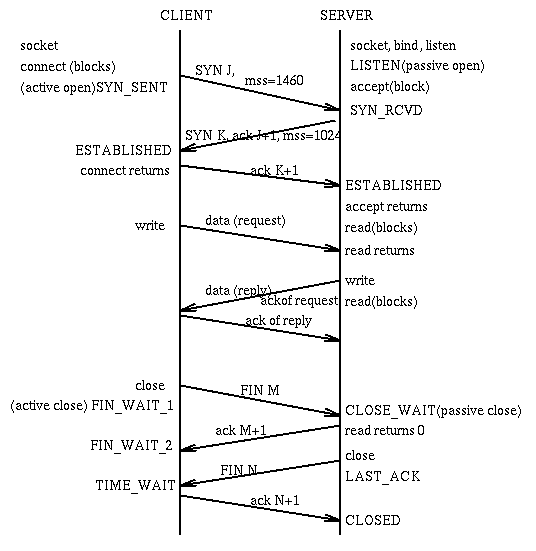
Also from Stevens is the following diagram that displays a typical interaction between a client and a server. Notice in particular the 3-way handshake when the connection is established and the 4-way handshake when the connection is terminated. [mss stands for Maximum Segment Size.]
You may use the netstat command to determine the sockets currently used in the system, the protocol they use, the local host+port, the remote host+port, and the socket state. For example in my machine netstat printed out (truncated):
Active Internet connections
Proto Recv-Q Send-Q  Local Address          Foreign Address        (state)
tcp        0      0  joda.80                sp185047.sbm.tem.2129  ESTABLISHED
tcp        0      0  joda.80                sp185047.sbm.tem.2128  TIME_WAIT
tcp        0      0  joda.80                sp185047.sbm.tem.2127  TIME_WAIT
tcp        0      0  joda.80                sp185047.sbm.tem.2126  TIME_WAIT
tcp        0      0  joda.80                sp185047.sbm.tem.2123  ESTABLISHED
tcp        0      0  joda.80                sp185047.sbm.tem.2122  TIME_WAIT
tcp        0      0  joda.80                sp185047.sbm.tem.2121  TIME_WAIT
tcp        0      0  joda.80                ww-to06.proxy.ao.1280  TIME_WAIT
tcp        0      0  joda.pop3              bamboo.1690            TIME_WAIT
tcp        0      0  joda.80                dhcp40-98.netman.1631  FIN_WAIT_2
tcp        0      0  joda.80                hd1-220.hil.comp.1132  FIN_WAIT_2
tcp        0      0  joda.80                200.5.111.75.1205      FIN_WAIT_2
tcp        0      0  joda.80                hd1-220.hil.comp.1129  FIN_WAIT_2
tcp        0      0  joda.2197              wilma.flair.temp.6000  ESTABLISHED
tcp        0      0  joda.imap              cc16262-a.wlgrv1.1922  ESTABLISHED
tcp        0      0  joda.80                207.205.89.226.38539   FIN_WAIT_2
tcp        0      0  joda.80                207.86.17.198.3866     FIN_WAIT_2
tcp        0      0  joda.2105              joda.2104              CLOSE_WAIT
tcp        0      0  joda.telnet            bamboo.1445            ESTABLISHED
tcp        0      0  joda.telnet            mrgrump.2056           ESTABLISHED
tcp        0      0  joda.telnet            wilma.flair.temp.33079 ESTABLISHED
tcp        0      0  joda.1547              joda.80                CLOSE_WAIT
tcp        0      0  joda.1538              www.Sun.COM.80         CLOSE_WAIT
tcp        0      0  joda.1533              wilma.flair.temp.6000  ESTABLISHED
tcp        0      0  joda.telnet            warhog.2316            ESTABLISHED
tcp        0      0  joda.1482              wilma.flair.temp.6000  ESTABLISHED
tcp        0      0  joda.telnet            wilma.flair.temp.33077 ESTABLISHED
tcp        0      0  localhost.1032         *.*                    LISTEN
tcp        0      0  localhost.1031         *.*                    LISTEN
tcp        0      0  localhost.1030         *.*                    LISTEN
ingargiola@cis.temple.edu