Lecture Set 2 - An Introduction to C
Required Reading – HK (Hanly/Koffman), Chapter 2 (complete it)
Required Assignments – Lab 1: English Coins
We begin today with an examination of US Coins program being done this week in lab.
We had had a chance now to examine a complete program written in C – in fact, we have seen complete programs in the book and in the notes on the web.
We need have to take a more structured look at the instructions (lines of code) in these programs to understand how they work.
First – we have to understand an important principle.
Lots of names (identifiers) appear in the programs we
have seen. There are two types of these identifiers: reserved
words, and user-defined identifiers. Reserved words have a special meaning as defined by
the C language and you should try to never use them for any other
purpose. Principle: User-defined identifiers, on the other
hand, must be declared in one way or another, before they used. Otherwise, the compiler will give you an
error.
As it turns out, some identifiers are defined for us as part of the C Standard Library components. We will find it very helpful to use and reuse these components whenever
possible.
Let’s see how this might be done.
A. Compiler directives - general
1. Compiler directives are handled by the C pre-processor as it makes its first pass through your program file.
2. The resulting pre-processed file is then compiled in the second pass by the C compiler to generate the object file which is in the machine language code
B.
The #include directive
How #include works:
Include the contents of another file, commonly called a header file, in your file
The line of code where the #include compiler directive occurs is replaced by the contents of the header file
Example 1: If the contents of a header file named myinclude.h were:
/* This is an empty include file with nothing but comments */
/* There is no meaningful code in this file */
and the program file contained the following lines of code:
#include "myinclude.h"
int
main ()
{
printf ("This is a 1 line program\n");
}
the pre-processing step would produce the following lines code:
/* This
is an empty include file with nothing but comments */
/*
There is no meaningful code in this file */
int
main ()
{
printf ("This is a 1 line
program\n");
}
Example 2:
#include
<stdio.h>
(The angle brackets < > tell the C pre-processor that the included file is a C Standard Library header file (sometimes called a “system” file.)
What other kind of library header file
is there?
The standard input/output library file, stdio.h, contains the declarations (definitions) of all the standard names needed to do input and output in our programs. It must be included, for example, to use the printf and scanf Standard Input / Output functions
Note 1: The C Standard Library (the header and implementation files) come with the C compiler software. There are 18 such libraries, including stdio, and library files for string manipulation functions, math functions, character manipulation functions, etc.
Note 2: You don't have to know where system header files are located the C pre-processor knows where to find them
Example 3: #include "myheader.h"
Include the source code for header file myheader.h
Double quotes, "", tell the C pre-processor that the included
file is a user-defined header file as opposed to a C Standard Library header
file.
-- User defined header files are header files that you create
-- If the user defined header file is not located in the same directory where you compile the program then the information inside the double quotes must contain the path information for the user defined header file, the C pre-processor does not know where to find user defined header files
myheader.h may define information specific to your program
-- This assumes that the file myheader.h is located in the same directory where the program is compiled
C. The #define
directive
How #define works:
Defines a macro constant (or, naming a macro constant) - the defined macro constant name is automatically replaced by the macro constant value throughout the program file
Example 1:
#define KMS_PER_MILE 1.609
Substitute the macro constant name KMS_PER_MILE with the macro
constant value 1.609 throughout the program file
We would write the C line of code
kms
= miles * KMS_PER_MILE;
After the C pre-processor step, this line would look like this:
kms = miles * 1.609;
D. Comments
How comments work:
§ Comments are statements that clarify the meaning and content of your program file
§ Comments are a means of documenting your program code so that people can better understand how the program is works
§ Comments are removed by the C pre-processor before the resulting program code is compiled so the C Compiler does not see them but they can be read by humans looking at the contents of your program file
§ Comments start with /* and end with */
EVERYTHING between /* and */ is removed by the C pre-processor
Example 1:
/* This is a single comment */
Example 2:
/*
* This is also a single comment
*/
Note 1: Be VERY careful to terminate your comments correctly or you may get surprising results!
Example 3: The comment on the first line (below) is not terminated which results in the C pre-processor removing the #include and #define statements that follow it. It is as though these lines were never in the program to begin with.
/* Include the standard input and output header file
#include <stdio.h>
#define KMS_PER_MILE 1.609 /* Kilometer conversion factor */
int
main
()
{
...
This kind of error is very hard to find, by the way – just like a lot of other errors.
Why
isn’t the additional code (int, main, etc) also “swallowed up by the
pre-processor?
Example 4: The comment on the first line (below) is terminated which results in the C pre-processor processing the #include and #define statements:
/*
Include the standard input and output header file */
#include <stdio.h>
#define KMS_PER_MILE 1.609 /* Kilometer conversion factor
*/
int
main
()
{
...
E. Declaring variables and data types
§ Declaring a variable reserves enough bytes in RAM memory to store value of the declared type.
A data type is a set of values and a set of operations on those values.
The values and operations “go together.” You can think of them as a unit that looks like this:
The int type …
output
(print)
 operations such as
mod % (remainder)
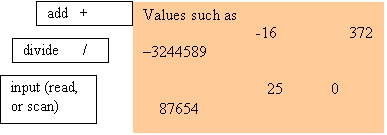
§ Some of the intrinsic or predefined types (those included or supported in the C language) are char for character values, int for integer values and float or double for real values.
§ The objects of a data type can be variables or constants. You can get a brief introduction to data types in the Hanly/Koffman text, Section 2.2, pp 42-44. We will cover more about them later (in Chapter 7).
§ Note that there is no string data type. There is also no logical or bool data type. We will have more to say about this later.
Type Bytes Reserved Declared variables can store
------ ------------------- --------------------------------------------
char 1 byte of RAM Characters such as 'A', '-', 'z', etc.
int 4 bytes of RAM Integer numbers such as 1, 3, 100, etc.
double 8 bytes of RAM Real numbers such as 1.5, 0.75, 100.10, etc.
§ The appropriate type of value can be written to or read from the reserved memory by referring to the associated variable name
Example 1: Declare the variable miles that can store a real number
double miles;
8 bytes of memory that can store real values are now reserved in RAM and are associated with the variable name miles
We can assign a value to the variable miles
miles
= 1.5;
The 8 bytes of reserved memory associated with the variable name miles now contain a series of 0's and 1's that represent the real value 1.5
Example 2: Read a value from the variable miles
scanf (%f, &miles);
printf ("The value of
miles is %f\n", miles);
The series of 0's and 1's that are contained in the 8 bytes of reserved memory associated with the variable name miles is read as the real value 1.5 and printed to the screen:
The value of miles is 1.5
Example 3: Declare the variables kids and courses that can store integer numbers
int
kids, courses;
4 bytes of memory that can store integer values are now reserved in RAM and are associated with the variable name kids
4 bytes of memory that can store integer values are now reserved in RAM and are associated with the variable name courses
Example 4: Declare the variable initial that can store characters
char initial;
1 byte of memory that can store a character value is now reserved in RAM and is associated with the variable name initial.
F. Calls to the input and output library functions
As we mentioned earlier, all C programs are written as a collection of functions, including the “main” function. There are two kinds of functions: user-written functions such as main, and C Standard Library (CSL) functions. All remaining information in this section pertains to CSL functions for input (scanf) and output (printf).
1. printf - Output text to the user
Form: printf
(format string);
§ The format string is enclosed by double quotes "" and may contain any literal text, placeholders (or format specifiers) and format control characters such as the \n which means "new line"
§ Literal text is interpreted literally by the compiler and does not cause the program to perform any action
§ Format control characters are interpreted as a format control action by the compiler
1) The compiler will generate an instruction in the program to
take the appropriate format control action
2) The program will perform an action such as moving the cursor
to the beginning of the next line
3) Format control characters are not displayed on the screen but
instead cause some format control action to occur
Example 1: \n causes the program to move the cursor to the start of the next line, the program does NOT actually print the characters \n on the screen
Example 2: The line
printf ("Move the cursor to the next line\n");
displays the following output on the screen:
Move the cursor to the next line
_
Example 3: The line
printf ("Enter distance in miles> ");
would display the text:
Enter the distance in miles>
on the screen leaving the cursor at the end of the line
Form: printf
(format string, output list);
§ The output list consists of a list of variables or values that will replace the corresponding format specifiers or placeholders in the format string. The format specifiers or placeholders all begin with the symbol %
§ The variable(s) and value(s) correspond positionally to the format specifiers in the format string
§ The first variable or value in the output list replaces the first format specifier in the format string, the second variable or value in the output list replaces the second format specifier in the format string, etc.
Example 1: The line
printf
("int: %d double: %f char: %c\n", 1, 1.0, 'A');
would display the text:
int:
1 double: 1.0 char: A
on the screen and move the cursor to the start of the next line
The value 1 would replace the %d format specifier, the value 1.0 would replace the %f format specifier and the value A would replace the %c format specifier in the format string
Example 2: The lines
double miles;
miles
= 10.0;
printf ("The distance in miles is
%f\n", miles);
would display the text:
The
distance in miles is 10.0
on the screen and put the cursor at the beginning of the next line.
The value of the variable miles would replace the %f format specifier in the format string. There must be as many variable(s) and value(s) in the output
list as there are format specifiers in the format string.
2. Formatting output
§ Format specifiers can have modifiers to control the total number of columns and decimal places displayed
§ Format modifiers have the form field_width.decimal_places where field_width is the total number of columns displayed and decimal_places is the number of decimal places displayed for real numbers
The decimal point itself counts as 1 in determining the total field width
Example 1: The line
printf ("%6.2", 4.9653);
will display the value 4.9653 in 6 columns with 2 decimal
places and 1 decimal point as ##4.97 for a total of 6 columns
Note that real values are rounded to the number of decimal places specified
Other Examples: Sample output using format modifiers
printf ("%.2f",
4.9653);
will display 4.9653 rounded to 2 decimal places as 4.97
printf ("%.1f",
4.9653);
will display 4.9653 rounded to 1 decimal place as 5.0
printf ("%6d", 25);
will display 25 in 6 columns as ####25
printf ("%6.1f",
25.0);
will display 25.0 in 6 columns with 1 decimal place and the
decimal point as ##25.0
3. scanf - Input text from the user
Form: scanf
(format string, input list);
The
input list consists of a list of variables that will get values of the type
that correspond positionally to the format specifiers in the format string.
The first variable in the input list gets a value of the
type specified by the first format specifier in the format string, the second
variable in the input list gets a value of the type specified by the second
format specifier in the format string, etc.
Example 1: Consider the input lines
double miles;
printf ("Enter the
number of miles> ");
scanf ("%lf",
&miles);
The value input by the user is interpreted as a real number because of the %lf format specifier and stored in the "address of" or "location of" the variable miles
Example 2: The lines
int integer_value;
double double_value;
printf ("Enter an integer value and a double value> ");
scanf ("%d %lf", &integer_value, &double_value);
would
get two numeric values from the user, the first numeric value would be stored as an integer value in the
location in memory associated with the variable integer_value, the second numeric value would be stored as a real
value in the location in memory associated with the variable double_value.
The
first value input by the user is interpreted as an integer number because of
the %d format specifier and stored in the "address of" or
"location of" the variable
integer_value, the second value input by the user is interpreted as a real number because of the %lf format specifier and stored in the "address of" or "location of"
the variable double_value.
There
must be as many variable(s) and value(s) in the output list as there are format
specifiers in the format string
Example 3: Reading multiple data items with the same scanf function call
-- For each data item to be read in there must be a format specifier and a corresponding variable address or location in memory to store the input value
-- The first value read in is interpreted based upon the first format specifier in the format string and stored in memory cell specified by first variable in the input list. The second value read in is interpreted based upon the second format specifier in the format string and stored in the location in memory of the second variable in the input list, etc.
Consider the following lines of code:
printf ("Enter hours and rate >");
scanf ("%lf%lf", &hours, &rate);
The first value read in is interpreted as a real number and stored in the location in memory of the variable hours, the second value read in is interpreted as a real number and stored in the location in memory of the variable rate.
NOTE: The values that are entered (read or scanned in) must be separated by at least one space between them.
Example 4: The lines
char
first, second;
printf ("Enter your
two initials >");
scanf ("%c%c",
&first, &second);
would
require that you enter two characters one after the other, with at least one
space between them..
Example 5: The lines
printf ("Enter your two initials >");
scanf (" %c %c", &first, &second);
would require that there be at least one blank space between the characters.
4. Important notes and reminders on previous material …
a. Literal text consists of any characters or strings of characters that are NOT themselves format control characters or are preceded by format control characters.
b. Literal text in a printf function call is interpreted as the actual text contained in the format string which is not interpreted in any special way by the compiler.
c. Format control characters (starting with a backslash \) are interpreted action characters and cause the program to perform an action such as moving the cursor to the start of the next line or moving the cursor to a new tab position.
\n - Move the cursor to the beginning of a new line
\t - Move the cursor 1 tab position in the current line
d. Format specifiers consist of a combination of characters that begin with the % character followed by lf, f, d or c. These combinations of characters may be thought of as placeholders for the value of a variable or constant of the specified type in the format string:
%lf - Placeholder for a long double value in the format string
%f - Placeholder for a double value in the format string
%d - Placeholder for an integer value in the format string
%c - Placeholder for a character value in the format string
~~~~~~~~ The material below will be moved to another lecture set ~~~~~~~~~~
G. Calls to the file input and output library functions
a) Programs can read input from files and write output to files in addition
to reading input from the keyboard and writing output to the screen
1) Files must be opened using the fopen function before they can be read
from or written to
2) There are special versions of the printf and scanf functions used to
read input from files and write output to files
The file input and output function names are similar to the input
and output functions described above in Section 4, "Calls to the
input and output library functions", but begin with the letter "f"
fprintf - print information to a file (output)
fscanf - read information from a file (input)
3) Files must be closed using the fclose function in order to save any
changes to the file
1. fopen - Open a file for reading or writing
Form: fopen (file name, mode);
a) The file name and mode are both enclosed by double quotes ""
b) File names may be any valid file name that can exist under the
operating system and can include path information:
"myfile.dat"
"/users/home/input.txt"
"c:output.txt"
"../program.inp"
If the path information is not specified then the file location is
assumed to be the directory where the program was run from which
is known as the working directory
c) Modes can be "r", "w" or "a"
1) "r" - Open the named file for reading only from the beginning
of the file, the named file must exist in order to be
opened successfully, the contents of the file can not
be changed
2) "w" - Open the named file for writing from the beginning of
the file, the named file will be created if it doesn't
exist, if it does exist then the original contents of
the file will be overwritten regardless of whether any
file operations are performed or not
3) "a" - Open the named file for writing from the end of the file,
the named file will be created if it doesn't exist, if
it does exist then the original contents of the file will
not be changed, all write operations are "appended" to
the end of the file
2) fopen will return a FILE pointer to the named file if the file was
opened successfully otherwise fopen will return an empty or NULL
pointer to indicate the file was not opened successfully:
/* Declare the file pointer file_ptr */
FILE *file_ptr;
/* Open the file name "myfile.inp" in the current directory */
/* for reading only and assign the pointer associated with */
/* the file to file_ptr */
file_ptr = fopen ("myfile.inp", "r");
If the file is NOT opened successfully then the file pointer will
be empty or NULL and you can NOT use the file pointer in calls to
fprintf, fscanf or fclose or the program will abort!
2. fclose - Close a file to save any changes to the file
Form: fclose (file pointer);
The file pointer must NOT be empty or NULL and must have been
assigned using a call to fopen as described in Section 5b, "fopen
- Open a file for reading or writing" above!
2) fclose will close the file associated with the file pointer and save any changes to the file
/* Declare the file pointer file_ptr */
FILE *file_ptr;
/* Open the file name "myfile.out" in the current directory */
/* for writing and assign the pointer associated with the */
/* file to file_ptr */
file_ptr = fopen ("myfile.out", "w");
/* Print the statement "File is open" to the file associated */
/* with file_ptr */
fprintf (file_ptr, "File is open\n");
/* Close the file associated with file_ptr */
fclose (file_ptr);
Note that you can NOT use the file pointer once the file has been
closed or the program will abort because the file pointer is no
longer associated with an open file!
3. fprintf - Output text to a file
Form:
fprintf works the same way as printf in terms of the format string and optional
output list as described in Section 4a, "printf - Output text to the
user" above
2) Calls to fprintf MUST also include a file pointer associated with
the file where the output will be written to as the first argument:
fprintf (file pointer, format string);
fprintf (file pointer, format string, output list);
Note that the file pointer used in the call to fprintf must have
been assigned using a call to fopen as described in Section 5b,
"fopen - Open a file for reading or writing" above!
/* Declare an integer variable for input from the user */
int integer_value;
/* Declare the file pointer file_ptr to associate with the file */
FILE *file_ptr;
/* Open the file name "myfile.out" in the current directory */
/* for writing and assign the pointer associated with the */
/* file to file_ptr */
file_ptr = fopen ("myfile.out", "w");
/* Get an integer value from the user and store the value in */
/* the variable integer_value */
printf ("Enter an integer value > ");
scanf ("%d", &integer_value);
/* Print the value entered by the user to the file associated */
/* with file_ptr */
fprintf (file_ptr, "The user entered the value %d\n", integer_value);
/* Close the file associated with file_ptr */
fclose (file_ptr);
4. fscanf - Input text from a file
Form: fscanf works the same way as scanf in terms of the format string and input list as described in Section 4b, "scanf - Input text from the user" above
2) Calls to fscanf MUST also include a file pointer associated with
the file where the input will be read from as the first argument:
fscanf (file pointer, format string, input list);
Note that the file pointer used in the call to fscanf must have
been assigned using a call to fopen as described in Section 5b,
"fopen - Open a file for reading or writing" above!
/* Declare an integer variable for input from the file */
int integer_value;
/* Declare the file pointer file_ptr to associate with the file */
FILE *file_ptr;
/* Open the file name "myfile.inp" in the current directory */
/* for reading and assign the pointer associated with the */
/* file to file_ptr */
file_ptr = fopen ("myfile.inp", "r");
/* Read an integer value from the file associated with file_ptr */
fscanf (file_ptr, "%d", &integer_value);
/* Print the value read from the file to the screen */
printf ("The value read from the file is %d\n", integer_value);
/* Close the file associated with file_ptr */
fclose (file_ptr);
5. Standard File Pointers
1) C provides 3 Standard File Pointers that are automatically opened
when the program starts
a) stdin - "Standard Input" associated with the keyboard
b) stdout - "Standard Output" associated with the screen
c) stderr - "Standard Error" associated wiht the screen
The keyboard and screen are actually considered "files" that are read
from and written to in the same way that a file on disk is
stdin, stdout and stderr are NOT the names of files that are created
on the disk but rather they are file pointers that are associated
with the keyboard and screen which are I/O devices in the same way
that a file on disk is considered an I/O device
2) The Standard File Pointers are constant and can NOT be changed by
the program
3) fprintf and fscanf can be used with the Standard File Pointers so
that they behave identically to printf and scanf
a) printf is a special console version of fprintf that automatically
writes to the stdout file pointer which is the screen
/* The following two statements are equivalent! */
printf ( "Display a message on the screen\n");
fprintf (stdout, "Display a message on the screen\n");
printf writes information to the screen automatically
fprintf writes information to the screen when used with the stdout
file pointer which is associated with the screen!
b) scanf is a special console version of fscanf that automatically
reads from the stdin file pointer which is the keyboard
/* Declare an integer variable to get input from the keyboard */
int integer_value;
/* The following two statements are equivalent! */
scanf ( "%d", &integer_value);
fscanf (stdin, "%d", &integer_value);
scanf reads information from the keyboard automatically
fscanf reads information from the keyboard when used with the
stdin file pointer which is associated with the keyboard!